In order to make the 3d Model ball in photo shop I took very simple steps.
The first step was to make simple rectangles going up and then across to make a criss cross symbol pattern. This was to make the main base of the 3D model ball. And the starting step.
The second step was to then use the elliptical marquee tool (M) which was to help with cutting out a circular shape from the criss cross pattern.
The third step was to flatten the cutout lines, before then going on to to filter and distort to then spherize the circle shape inside to give it a more enhanced look.
The fourth step was to then copy and paste it into a different layer so the remaining background criss cross pattern was removed and only the ball shape remained. This was to make it easier to cut out the small white spaces between the gaps of the criss crosses before then colouring the patterned circular shape in certain colours.
The fifth step was to then copy the shape and paste it again onto a different layer and change the colours to a more darker shaded tone of the already selected colours, this was to help create the depth and vision as if there is an actual space inside the circle.
The sixth step was to rotate an scale the circular shape darkened toned version in order to give a double criss cross effect in order to make the background of the ball visible.
After this the final steps was to then make a background colour to help coexist with the ball and make it stand out more, and also to blur the lines out and brighten certain edges to give it a more broadened look.
One last step in the process was to resize the shapes and under layers and move it the background in order to create a shadow on the lower part of the design, this was to give the impression that the ball is on a flat surface.
Here is the final product I created.
Here is also a link to a site that I used to help me as a small tutorial: http://abduzeedo.com/node/62900
My name is Maria Danneau, I'm a student at Croydon College. Currently taking a course in Animation and Game Design. I love to draw and test my skills, I have a huge interest in drawing animals. I am hoping to learn a lot from this course to help me further progress in my efforts to work in the animation industry. Underneath is all the posts i have done related to the work in my course. Please feel free to look through my work and leave any comments of advice/tips. Thank you.
Thursday, 22 February 2018
Friday, 2 February 2018
Where I See Myself In The Future. - UNIT 9
Difficult question to answer when it comes to what I want to do with my future in the animating industry. However I have given this much thought and I am very, very interested in working with simple 2D animation and the concept of this idea in general has always sparked an interest for me.
My interest in this picked up when I first watched animators on youtube, the fun designs and silly drawing made me laugh an gave me motivation to start drawing, the idea that you can create life from nothing but a pencil and your mind fascinated me. I often watched animators who took audio clips from famous you tubers such as Markiplier, Pewdiepie, Jacksepticeye etc. And they made their own interpretation using their art and animation skills. Very basic and simple drawings that somehow lead 100,00s of people to enjoy it because even though it was so simple it was a funny and creative idea they often drew for the audio.
Ever since then I have worked hard on drawing and getting my own style so that I can put my ideas to the test and make small simple animations for audio clips to youtubers I have enjoyed working. I feel like youtube is good place to start with my animating progress because its a world wide used app and a great open door for job opportunities, even though it may not seem like much people can often get noticed through youtube and get a job hey have always wanted. Some of these youtubers I speak of have actually been noticed by the yotubers they animate audio clips to and can sometimes end up being paid to do more and gaining a job from it, or even being noticed on the youtubers channel to help further the animators channel and increase their chances of job opportunities.
However this is just a small step for me, one day I hope to be noticed by an actual animating industry and join a team of other people like me that share a passion for bringing drawings to life and make it into a new and fresh project design that can show people how much we love our work and express our passion through our work.
I have always been a very enthusiastic person when it comes to drawing animals or certain people I admire, I have wished for a long time to be able to turn this into a work experience where I can enjoy the outcome of the effort and time I have put into something. Its often said its hard to be a person whose lucky enough to wake up and be ready and happy for their work because its something truly love and desire. But I am optimistic and hold hopes that if I keep pushing and challenging myself I can get noticed and take my passion further.
I have also had a passion in creating characters and thinking of comic ideas, the fun and creative side of controlling what happens on a world made up entirely from your mind has always fascinated me too. To get attached to characters of your creation and express your feelings so much that it helps other to feel their pain or sorrow and go through their story with them is mind blowing.
I have worked with a friend by the name Lucy Burgess who has shared ideas and creations with me and have start to create a small comic by the name of The Abnormals. Its so fun and rewarding working with her as she has amazing talents and with her art and mine mixed with a well thought out story line excites me when I think of how it could be when its finally finished. I hope we continue our work on this as i've never enjoyed anything as much as this.
In my conclusion I guess all I can say is I hope and pray that I can one day work with 2D animating projects or be a comic writer and share great experiences with other talented people.
My interest in this picked up when I first watched animators on youtube, the fun designs and silly drawing made me laugh an gave me motivation to start drawing, the idea that you can create life from nothing but a pencil and your mind fascinated me. I often watched animators who took audio clips from famous you tubers such as Markiplier, Pewdiepie, Jacksepticeye etc. And they made their own interpretation using their art and animation skills. Very basic and simple drawings that somehow lead 100,00s of people to enjoy it because even though it was so simple it was a funny and creative idea they often drew for the audio.
Ever since then I have worked hard on drawing and getting my own style so that I can put my ideas to the test and make small simple animations for audio clips to youtubers I have enjoyed working. I feel like youtube is good place to start with my animating progress because its a world wide used app and a great open door for job opportunities, even though it may not seem like much people can often get noticed through youtube and get a job hey have always wanted. Some of these youtubers I speak of have actually been noticed by the yotubers they animate audio clips to and can sometimes end up being paid to do more and gaining a job from it, or even being noticed on the youtubers channel to help further the animators channel and increase their chances of job opportunities.
However this is just a small step for me, one day I hope to be noticed by an actual animating industry and join a team of other people like me that share a passion for bringing drawings to life and make it into a new and fresh project design that can show people how much we love our work and express our passion through our work.
I have always been a very enthusiastic person when it comes to drawing animals or certain people I admire, I have wished for a long time to be able to turn this into a work experience where I can enjoy the outcome of the effort and time I have put into something. Its often said its hard to be a person whose lucky enough to wake up and be ready and happy for their work because its something truly love and desire. But I am optimistic and hold hopes that if I keep pushing and challenging myself I can get noticed and take my passion further.
I have also had a passion in creating characters and thinking of comic ideas, the fun and creative side of controlling what happens on a world made up entirely from your mind has always fascinated me too. To get attached to characters of your creation and express your feelings so much that it helps other to feel their pain or sorrow and go through their story with them is mind blowing.
I have worked with a friend by the name Lucy Burgess who has shared ideas and creations with me and have start to create a small comic by the name of The Abnormals. Its so fun and rewarding working with her as she has amazing talents and with her art and mine mixed with a well thought out story line excites me when I think of how it could be when its finally finished. I hope we continue our work on this as i've never enjoyed anything as much as this.
In my conclusion I guess all I can say is I hope and pray that I can one day work with 2D animating projects or be a comic writer and share great experiences with other talented people.
Thursday, 25 January 2018
Research On 3D Animation. - UNIT 6
Other Animators Work;
I have learned a lot on models and animation in a 3D application, I follow the developers of a game called The Isle in which the game is about surviving as humans or dinosaurs in a land of unknown time. Its an early access game and much is still to be done, but I follow closely on the blogs and posts they make on the working in progress.
They show designs of models and real life creatures they used for its over all finished idea.
These are two dinosaurs from the many they have created and are still in the progress of making. They use a special and professional site to create the models and animations of these creatures and living organisms.
They show how they use rendering and how they use polygons and particles to complete the work with a smooth animation. They show the timelines and what runs along it at certain points to help them predict when to edit certain parts of the model and make it look as realistic as possible. They often show the design templates first that they have roughly sketched out and what real life influences and references they used.
They also make it clear they use informational sites on dinosaurs and prehistoric history with the proof that it is valid and came from an expert of the research. They take as much influence and inspiration they can from the truth in history about the creatures and mix it with some of their original and creative ideas to either create specially made (fictional) dinosaurs in which they call Hypos and then realistic outcomes (non-fictional).
Here are some examples of the non-fictional dinosaurs they made on 3D modelling sites when they had enough influence and references.
A lot of the ideas and references they used came from images and watching Emus and Ostriches walk around and do their average day thing as they are believed to be the closest relatives to dinosaurs. This helped me understand that its very important to look up references and information to help broaden your knowledge and understanding on the creature/item/object you are planning to model.
And here is an example of their first fictional creature.
They use certain textures and colouring to make the creature feel alive and believable and also scale and render with accuracy to make it seem the most proportionally correct as they can.
They had to start with 2D concepts first, 2D drawings are the first step and very important step of animating as it lets you get the details through first, its almost like your creating the guide and instructions to get the finalised product at the end.
My Work on 3D Models And Animation;
I have learned a lot on models and animation in a 3D application, I follow the developers of a game called The Isle in which the game is about surviving as humans or dinosaurs in a land of unknown time. Its an early access game and much is still to be done, but I follow closely on the blogs and posts they make on the working in progress.
They show designs of models and real life creatures they used for its over all finished idea.
![]() |
| Model from The Isle |
![]() |
| Model from The Isle |
They show how they use rendering and how they use polygons and particles to complete the work with a smooth animation. They show the timelines and what runs along it at certain points to help them predict when to edit certain parts of the model and make it look as realistic as possible. They often show the design templates first that they have roughly sketched out and what real life influences and references they used.
They also make it clear they use informational sites on dinosaurs and prehistoric history with the proof that it is valid and came from an expert of the research. They take as much influence and inspiration they can from the truth in history about the creatures and mix it with some of their original and creative ideas to either create specially made (fictional) dinosaurs in which they call Hypos and then realistic outcomes (non-fictional).
Here are some examples of the non-fictional dinosaurs they made on 3D modelling sites when they had enough influence and references.
![]() |
| Model by The Isle |
![]() |
| Model by The Isle |
![]() |
| Model by The Isle |
A lot of the ideas and references they used came from images and watching Emus and Ostriches walk around and do their average day thing as they are believed to be the closest relatives to dinosaurs. This helped me understand that its very important to look up references and information to help broaden your knowledge and understanding on the creature/item/object you are planning to model.
And here is an example of their first fictional creature.
![]() |
| Model by The Isle |
They post small videos on animations they have worked on or are working on to let the community that support their game get more of an insight on how difficult it really is to make a fully fledged game.
![]() |
| By The Isle |
![]() |
| Concept for The Isle |
![]() |
| Concept for The Isle |
![]() |
| Concept for The Isle |
They often asked for the community to send their ideas in to see if it would be good help and reference for their own creations, these are some of the concepts the developers of The Isle decided to use.
My Work on 3D Models And Animation;
All these posts by these developers have helped me get a better understanding on animation and animating on a 3D application, in which in my case I used Maya. I animated a small ball with legs hopping from the ground onto a small box. I used the application to see how I could cope. I understood about the timing and scaling of items and parts. I understood the different layers to help make it easier to animate in total. I used the graph editor to help bend and turn body parts of the model to make the movement more realistic, I also used different views from prospective to grid views to line up objects to stop collision and unnecessary clashing of textures.
Using Maya I realised how hard it is as I struggled to use the tools to bend the legs in the right places and make it look as smooth and accurate as possible. I had to use the rotation tool to turn the feet and face it in the right directions at the right times using the timeline to see where and when to move it, I used the scale tool to help make the box large enough so that the character jumps onto it and have it make sense that it could carry the characters weight and balance him properly. I also had to move him so that the jump would look realistic and not too small or far, the jump had to believable. I made sure I lifted him high enough so it didn't look silly seeing him almost 'fly' up in the air, I made the height of the jump and the distance accurate and believable.
I now understand the process of turning something from real life into a model on an 3D modelling site.
In comparison to the developers of The Isle and my small animation its very clear I need more time and more understanding to become more able to suit the more complicated tasks of animating and more in-depth features I can use.
I believe if I had been given more time I could have perfected the animation better and get further with my product.
Thursday, 18 January 2018
Horse Running Cycle (Small Animation Test) - UNIT 1,4,5 AND 7
Here is a simple horse running animation i did to try and practice on consistency and smoothness. I feel i did a good job and i am very proud with it, specially since horses have always been something i have struggled with.
I think the placing is good at it looks very straight and does not jolt around everywhere, however i went for an impression of it running and slowly moving right and left (in the horses view) so if it moves up and down very slightly i hope it can be seen its trying to move left and right.
Credit goes to Lucy Burgess for helping me make the horse template when i was struggling in some places.
Here is a reference to a video i watched to help get an idea of a running horse: https://youtu.be/zQDAUv6d_KY
I think the placing is good at it looks very straight and does not jolt around everywhere, however i went for an impression of it running and slowly moving right and left (in the horses view) so if it moves up and down very slightly i hope it can be seen its trying to move left and right.
Credit goes to Lucy Burgess for helping me make the horse template when i was struggling in some places.
Here is a reference to a video i watched to help get an idea of a running horse: https://youtu.be/zQDAUv6d_KY
Friday, 15 December 2017
Work On Still Life. - UNIT 2
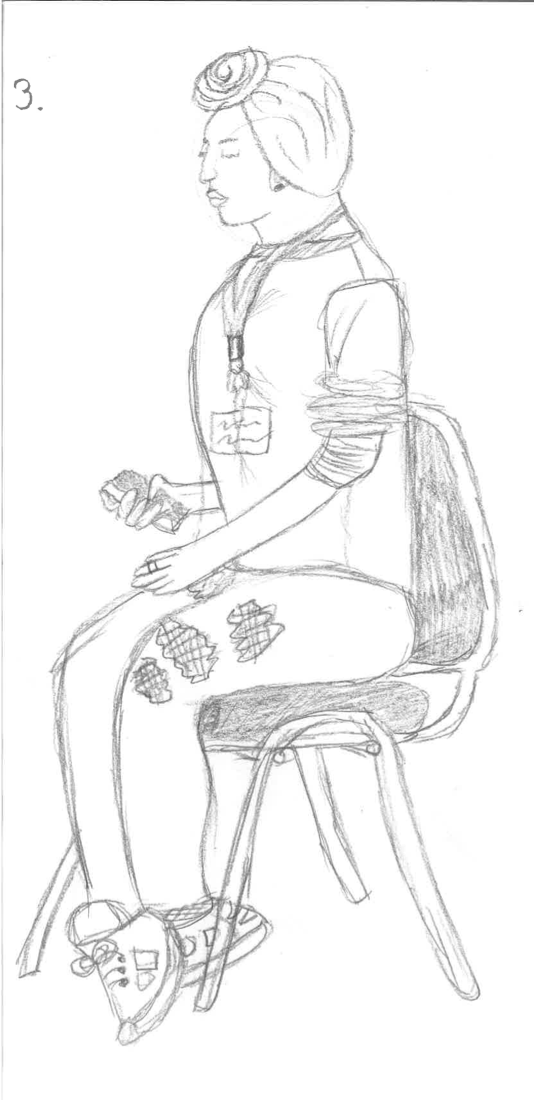
These are a few drawings I have done in my still life lessons, trying to draw students from my class and give it the right proportions and angle it the right way.
In all of them I think they do not look that great as I make their arms, or legs, or head bigger than the rest of the body and it gives of an odd experience and unnatural appearance when it is finished. But I guess for a first time in trying it could have been worse.
DreamWorks. (Research and Opinion.) - UNIT 2
DreamsWorks Logo:
DreamWorks Examples;
![]() |
| Example 1 |
![]() |
| Example 3 |
![]() |
| Example 2 |
Spirit Stallion of The Cimarron is one of my favourite childhood movies and I love it as it tells the story of love and determination in the eyes of a horse. The art is beautiful and the animation is very smooth and stunning in this film. The story line captivates me as well as the amazingly well drawn out animals and humans in this film.
There are other examples where Dreamworks as shown how talented they are such as Rise of The Guardians and Shrek. Just another two films that were very successful and loves by the public, due to their amazing stories and amazingly done animations and art style.
Most of Dreamworks characters focus on realistic features such as eyes, nose, mouth. And that is why when they are doing a character that is suppose to look odd and out the ordinary it is so well done because they can do things like have bigger eyes, a larger nose or a creepy mouth and it will stand out drastically and help give a more over exaggerated look to them. Increasing the comedic or creepy appearance they're trying to give off.
I hope to try focus my animations to look like Dreamworks one day.
Thursday, 14 December 2017
Materials I Use & Software. - UNIT 2
Materials I Use & Why.

I use shading pencils because they give you more control over how thick/thin you make lines, also help to structure my work in an accurate way to which I am pleased with. They also help to give light/dark shading texture to my drawings which help to give my drawing life and pop more off the page with character.
Normal Pencils
I use these to help with just basic editing most finished drawings I have already done, because they can help to darken out certain edges with less chance off a smudge effect to ruin the image. But I do not use these that often.
Brush Pens
I use these because they colour in designs I have made fast and efficiently with smooth looking lines and filled with a consistent tone of colour. The tip is shaped like a paint brush so it helps to cover more work quicker with a neat finish. It also has another tip on the other side which is a small point but this is good to help thicken and darken certain parts.
Coloured Pencils
I use these because they can give a soft expression with colour and can make the drawing look neater and more softer to the eye. It is also good for adding small effects on drawings.
Normal Pens
I don't use these that often because they can ruin your designs sometimes, but if you like to do simple rough sketches like I do sometimes this can be good to use because it gives a rough tone and expression.
Software I Use & Why.
PhotoShop.
I use photoshop the most because it is filled with many items and textures and effects, it is organised In a neat way to help you navigate the system easy and fast. You can use frame by frame animation options to help make your videos and animations in your own design and idea. You have detailed options that will help make sure you can edit and perfect your animation to your own liking. I feel this app is very useful to any artist wishing to do things like normal art and design or animation, you can explore many things and test your skills to improve your existing.
Subscribe to:
Posts (Atom)